


FAQs & support
Getting Started
A simple guide to help you set up and start your plants off beautifully.
Yes - the SmartyPlants app is free to download and use on iOS and Android. Everything you need to keep your plants thriving comes with your plant monitor.
Yes - SmartyPlants supports all kinds of indoor plants, from low-light ferns to sun-loving succulents. It's designed for houseplants of every shape and style, helping each one find its perfect balance.
Every SmartyPlants plant monitor includes a standard-length stem attachment. We also offer longer stems for deeper pots, to ensure you get the most accurate soil insight, from the top to the button of your pot.
You don't need one for every plant. Most people get bundles to cover their trickiest plants first. Plant monitors can be moved between plants, so you can focus monitoring where it matters most at any given time.
SmartyPlants starts learning straight away. From the moment it's in the soil, the plant monitor reads moisture, light, temperature, humidity and nutrients. It'll spot anything that needs attention right away. Over time, it builds a fuller picture of your plant's environment to further tailor insights.
Using Your SmartyPlants Plant Monitor
Everything you need to know about setup, placement, and how to keep your plants in perfect balance.
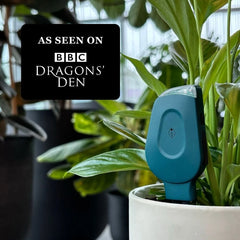
SmartyPlants is a discreet plant monitor that helps you understand exactly what your plants need. By measuring soil moisture, nutrients, light, humidity, and temperature, it takes the guesswork out of care and helping every plant thrive effortlessly.
Getting started is simple:
- Charge your plant monitor
- Download the SmartyPlants app and create your account
- Follow the setup steps to connect your plant monitor to Wi-Fi
- Place the plant monitor in your plant's soil
- Attach the plant monitor to a plant profile within the app
- Get insightful readings on the status of your plant.
You'll be up and running in
minutes.
Place the plant monitor in your plant's soil, connect it to the app, and SmartyPlants does the rest. It monitors your plant's environment and gently notifies you when attention's needed - whether that's a little more light, water, or time to move your plant to a new spot.
SmartyPlants connects via Wi-Fi to sync data with the app. Once connected, you'll see live updates and gentle care alerts. It doesn't require Bluetooth or any setup beyond a connection to your home Wi-Fi.
Home Assistant integration is currently in beta testing, and we’re making the final improvements before rolling it out to all SmartyPlants users. If you'd like access to the Beta, reach out to Lily@smartyplants.ai and we'll grant access. Stay tuned for the update!
SmartyPlants tracks the five essentials for healthy growth:
- Soil moisture
- Nutrient levels
- Light intensity
- Temperature
- Humidity
All working together to keep your plants in tip top shape.
The plant monitor is water-resistant and designed for indoor use. It can handle splashes from watering, but shouldn't be submerged or left outdoors.
Most people enjoy around 3 months of use before recharging. The plant monitor includes a long-life rechargeable battery and charges easily with a standard USB-C cable.
Each light gives you a quick glimpse into how your plant monitors doing.
- Power on: Hold the button until a green light appears (about 3 seconds).
- Power off: Hold the button until you see a red light (about 5 seconds).
- Charging: A solid red light means it's charging. The light will turn off once fully charged.
- Automatic data updates: Your plant monitor flashes green every hour to confirm it's sending data to the app - no need to press anything.
- Low battery: A red light flashes when the battery is low. Time for a recharge.
Check out our Sensor Light Guide for more clarity
If you ever need to start fresh, here's how to reset your plant monitor:
- When powered on, press the plant monitor button twice quickly.
- The light will begin blinking white to show it’s in reset mode.
- Quickly while the light blinks, hold the button.
- When complete, the light will turn green, confirming the reset worked.
- Let go of the button as soon as the green light appears.
- The blue light will then flash, indicating it is ready to be set-up again. If the reset fails, you’ll see a double red blink and the sensor will return to its previous state, ready for you to try the reset again.
For more clarify, check out our Factory Reset guide here.
The SmartyPlants App
Learn how the app works with your plant monitor to give simple, personalised care insights.
The SmartyPlants app is your simple companion for plant care. It displays live insights from your plant monitors, sends thoughtful reminders, and shares clear guidance for every plant in your collection - all in one calm, easy-to-use space.
Yes - the SmartyPlants app is free to download and use on iOS and Android. Everything you need to keep your plants thriving comes with your plant monitor.
Absolutely. Your personal data belongs to you. We never sell or share personal information, and all data is securely stored. See our privacy policy for full details.
Check out our Privacy Policy here
Orders & Shipping
Clear guidance on placing and receiving your order.
Unfortunately, we are unable to support international shipment at the time.
Shipping is free on all orders
All orders are shipped within 2-4 business days.
Returns & Warranty
Helpful support, easy returns, and coverage you can count on.
We offer risk-free 30-day returns. If it's not for you, simply send it back,
Every plant monitor is backed by a 2-year warranty for complete peace of mind.
Get In Touch
Have an idea, want to become an ambassador, stock SmartyPlants, or just have a chat?
Tell us which species you'd love to see added. We're always growing our library.
You can make a plant request directly in the in-app plant library. Alternatively you can email our UK-based customer support at lily@smartyplants.co.uk. Either way, we'll aim to get your request added within 48 hours.
Have a feature in mind? We love hearing how we can make SmartyPlants even better.
Amazing - we love to hear ideas!
You can tell us your idea via the in-app form, on our website, or you can email
us at lily@smartyplants.co.uk.
For media enquiries, collaborations, or brand partnerships - we'd love to connect.
Please email us at lily@smartyplants.co.uk and we'll be in touch.
Interested in helping us grow SmartyPlants as an official ambassador?
Please email us at lily@smartyplants.co.uk and we'll be in touch.
Interested in offering SmartyPlants in your store? Let's grow something together.
Please email us at lily@smartyplants.co.uk and we'll be in touch.